
A MICR font consists of 14 characters. They include the numbers 0-9, and four special characters. Space is used to produce a blank space. Two additional mappings are added to assist programming.
Table 2.1. Character Mappings in MICR Fonts
| Character | MICR Symbol | Mapping |
|---|---|---|
| One |  | 1 |
| Two |  | 2 |
| Three | 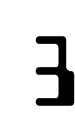 | 3 |
| Four |  | 4 |
| Five | 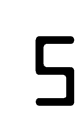 | 5 |
| Six |  | 6 |
| Seven |  | 7 |
| Eight |  | 8 |
| Nine |  | 9 |
| Zero |  | 0 |
| Transit Symbol |  | A or [ or ] |
| Amount Symbol |  | B or # or $ |
| On-US Symbol |  | C or @ |
| Dash Symbol |  | D or - |
Note: some symbols have multiple mapping. In these cases, any character in the list produces the same symbol. For example, typing either “-” (dash) or “D” produces a dash symbol.
The meanings of the four special symbols are briefly explained here, as below:
- Transit Symbol
The data between transit symbols indicates the institution which the check is drawn from. It is also called Routing Number in US.
- Amount Symbol
The data between amount symbols represents the amount. This portion does not usually appear in the check; it is used internally in the bank.
- On-US Symbol
This character indicates the following data represents the account number.
- Dash
This character separates the account number.
In addition to standard 13B symbols, our fonts contain an extra glyph
that looks like “X”. This drawing is accessible by typing X or S. It is a useful feature at the check
design stage. Because
there are many spaces in a MICR line, it is not easy to tell if a character is
placed in the specified positions by simply
counting characters. To make character position evident, first substitute
every space with character X. After
you are satisfied with work, change them back to spaces.
MICR printing standard was designed thirty years ago. At that time, those symbols must be printed using special impact machines and read with magnetic readers. The reader recognizes symbols based on the waveforms of lengths. Today, the vast majority of banks employ optical recognition method (OCR) to read MICR strips, and reading is generally not an issue.
Because MICR printing and reading are so widespread across the whole industry, many banks require new check designs to pass strict measurement validation. Contrary to what some manufacturers claim, there is no “certified” MICR font in the market. The result varies by the printing technology, software and paper.
Based on past experience in assisting many big customers to pass strict validation tests, this release takes the rasterization process into account. The result is more predictable and accurate. It should pass strict validation test without any calibration, if all the conditions below are met:
A 600 dpi and above laser printer.
Toner is equipped with magnetic ink (MICR Toner).
Paper is made of virgin pulp. Do not use recycled paper.
Symbols are arranged according to MICR line guidelines. The next chapter provides an overview on MICR line requirement.
If for any reason you still have issues with the printing results,
forward a copy of bank report to us at <support@morovia.com>.
We can determine the possible cause of the issue, and advise steps to work
around them.
Generally speaking you should always use typeface MRV MICR or MICR. These two fonts are designed to meet strict testing
requirement when printed on a 600-dpi printer.
The other font variants are designed to overcome situations that' may affect printing quality. For example, paper could shrink when heated up in laser printer. Toner could be over-filled or close empty. To choose one that produce the best result, you will need Calibration Wizard.
To run the calibration program, click on → → → → . Click to print a sample page. Wait until the paper is cool. Use an accurate ruler to measure the distance between the vertical bars in the MICR lines. Choose the one that is closest to 7 inches. Next, measure the stroke widths of three zeroes printed and choose the one that is closet to 0.13 inch. Combine the two results and you get the best typeface for your printing environment.